This is the third and final part of a three-part series about “An experiment – Enable Cilium native routing on Azure Kubernetes Service BYOCNI”.
We will focus today on how to enable Cilium native routing with Azure Route Server and BGP on Azure Kubernetes Service BYOCNI.
Azure Route Server
Azure Route Server is a comprehensive managed service from Azure designed to streamline dynamic routing management between network virtual appliances (NVAs) and Azure virtual networks. By leveraging Border Gateway Protocol (BGP), it facilitates automated route propagation between NVAs and the Azure Software Defined Network (SDN), removing the burden of manually configuring and maintaining route tables.
-> https://learn.microsoft.com/en-us/azure/route-server/overview
As mentioned in the first part of this series, Azure Route Server has a limit of 8 BGP peers it can support. That limits the number of Kubernetes nodes we can peer with the Azure Route Server to 8. For small test and demo environments, this might work. However, for large enterprise deployments, this is not practical at all, besides the fact that you must also manually add the peers to the Azure Route Server.
Solving these limitations and the automation part requires another solution. We will look at it in the next section, a BGP route reflector. The BGP route reflector setup consumes 2 BGP peer slots in an HA configuration when connecting to the Azure Route Server. Furthermore, it supports route reflector clients like our Cilium agents on the Kubernetes nodes with dynamic peering.
Before we dive deeper into the BGP route reflector setup, let us deploy the Azure Route Server first.
The Azure Route Server setup requires its own subnet within the Azure Virtual Network called RouteServerSubnet.
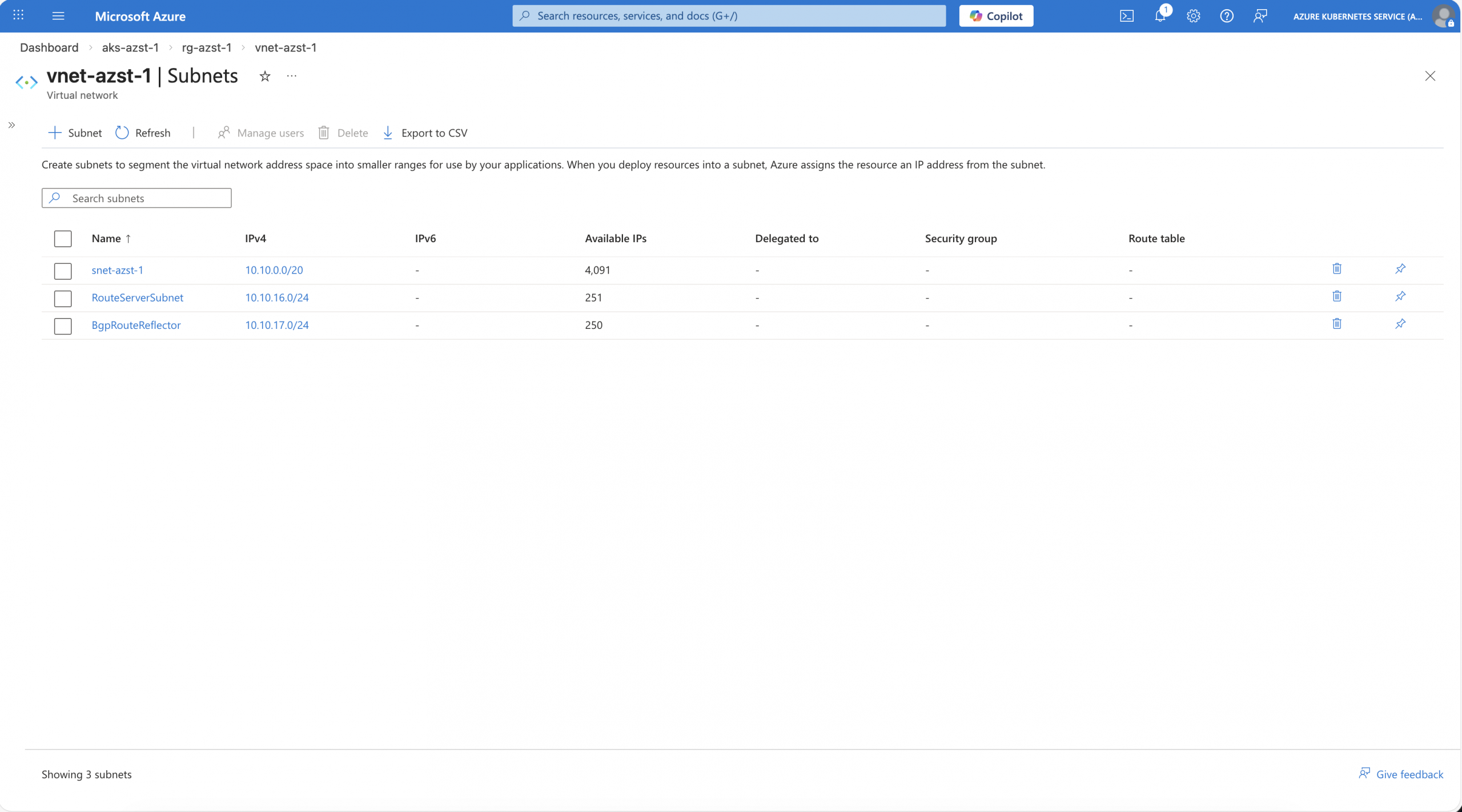
After the RouterServerSubnet has been deployed, we create the Azure Route Server.
$ subnetId=$(az network vnet subnet show --name 'RouteServerSubnet' --resource-group 'rg-azst-1' --vnet-name 'vnet-azst-1' --query id -o tsv)
$ az network public-ip create --resource-group 'rg-azst-1' --name 'vnet-azst-1-ip' --sku Standard --version 'IPv4'
$ az network routeserver create --name 'cilium-native-routing' --resource-group 'rg-azst-1' --hosted-subnet $subnetId --public-ip-address 'vnet-azst-1-ip'
Finalizing the initial Azure Route Server configuration, we set the following settings:
- Branch-to-branch -> Enabled
- Routing Preference -> ASPath
- Route Server capacity -> 2 Routing Infrastructure Units
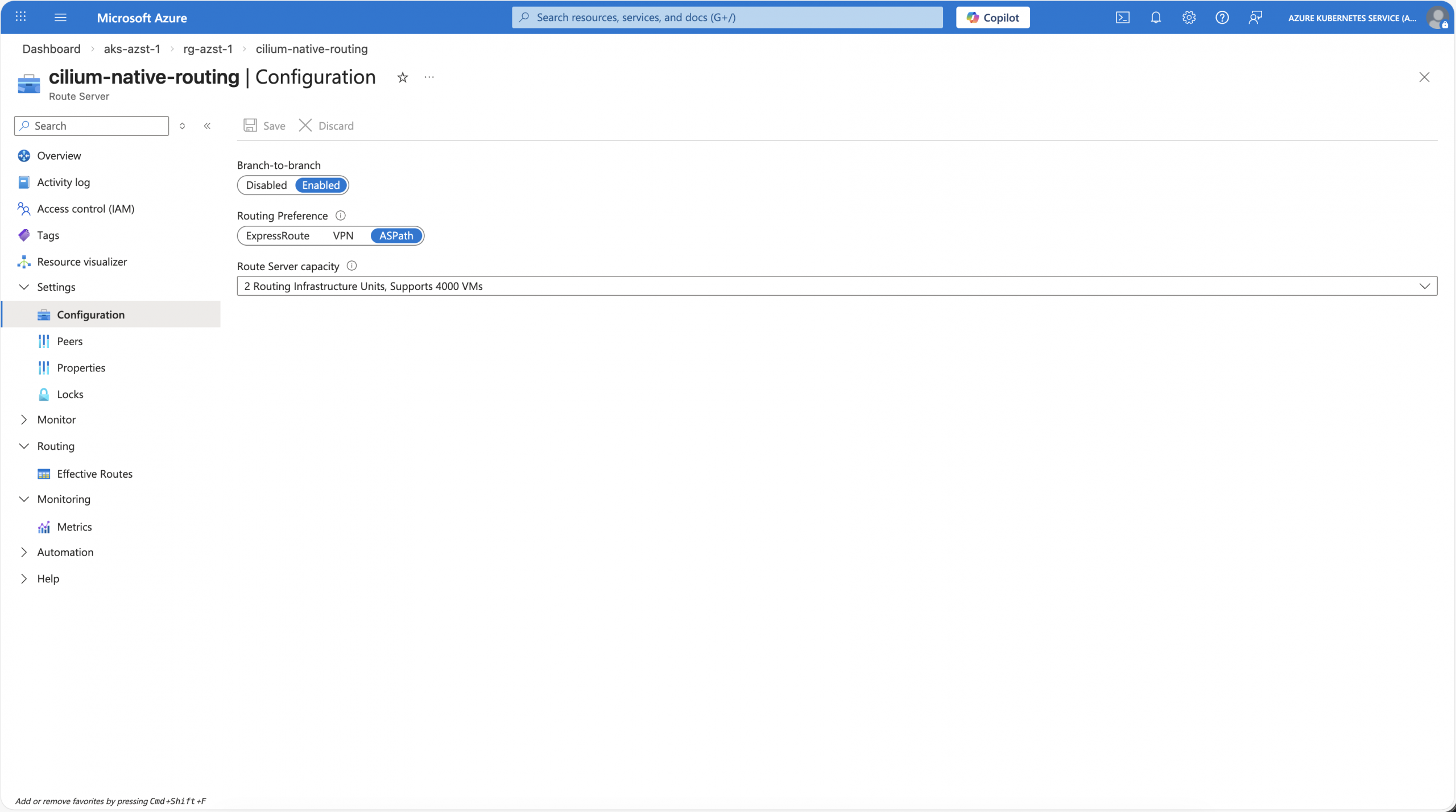
Currently, that is all for Azure Route Server, and we now come to the BGP route reflector.
BGP Route Reflector VM with FRR
The BGP route reflector, in our case, for enabling Cilium native routing with Azure Route Server and BGP on Azure Kubernetes Service BYOCNI, is required to solve the BGP peer limitation of the Azure Route Server and automate the BGP peering of the Cilium agents.
In this example, we only install one BGP route reflector VM. For a production setup, we at least require two BGP route reflector VMs for high availability.
Same as for the Azure Route Server, we create our own subnet for the BGP route reflector in the Azure Virtual Network called BgpRouteReflector.
Afterwards, we deploy an Ubuntu Server 24.04 VM into the previously created subnet and enable the IP forwarding setting on the Azure NIC of the VM.
-> https://learn.microsoft.com/en-us/azure/virtual-machines/linux/quick-create-portal?tabs=ubuntu
-> https://learn.microsoft.com/en-us/azure/virtual-network/virtual-network-network-interface?tabs=azure-portal#enable-or-disable-ip-forwarding
Once the VM has been provisioned successfully, we SSH into the VM to install FRRouting as the BGP route reflector.
Then, a couple of configuration steps follow to get the specific setup for Cilium native routing with BGP on Azure Kubernetes Service BYOCNI working.
First, we enable the bgpd daemon by modifying the /etc/frr/daemons file and setting bgpd to yes. The next step is to enable IP forwarding within the Linux kernel.
$ echo "net.ipv4.ip_forward=1" | sudo tee -a /etc/sysctl.conf
$ echo "net.ipv4.conf.all.forwarding=1" | sudo tee -a /etc/sysctl.conf
$ sudo sysctl -p
Starting with a clean configuration file, we remove the example config file /etc/frr/frr.conf and replace it with our own configuration frr.conf file in the same path.
# Custom config
log syslog informational
log file /var/log/frr/bgpd.log informational
log timestamp precision 6
!

# Send Cilium pod/service routes
ip prefix-list CILIUM_ROUTES permit 100.64.0.0/10 le 32
!
# Accept Azure VNet routes
ip prefix-list AZURE_ROUTES permit 10.10.0.0/16 le 32
!

# Required to prevent FRR from overriding next-hop for RR clients
route-map SET_NEXTHOP permit 10
 set ip next-hop unchanged
!

router bgp 65000
 bgp router-id 10.10.17.4
 bgp log-neighbor-changes

 neighbor CILIUM_NODES peer-group
 neighbor CILIUM_NODES remote-as 65000
 neighbor CILIUM_NODES description cilium-agents
 # Dynamic peering with Cilium Agents
 bgp listen range 10.10.0.0/20 peer-group CILIUM_NODES

 # Static peering with Azure Route Server
 neighbor 10.10.16.4 remote-as 65515
 neighbor 10.10.16.4 description Azure-RouteServer-1
 neighbor 10.10.16.5 remote-as 65515
 neighbor 10.10.16.5 description Azure-RouteServer-2

 address-family ipv4 unicast
  # Cilium nodes as RR clients
  neighbor CILIUM_NODES route-reflector-client
  neighbor CILIUM_NODES soft-reconfiguration inbound

  # Announce Cilium routes to Azure Route Server
  neighbor 10.10.16.4 prefix-list CILIUM_ROUTES out
  neighbor 10.10.16.5 prefix-list CILIUM_ROUTES out

  # Required to prevent FRR from overriding next-hop for RR clients
  neighbor 10.10.16.4 route-map SET_NEXTHOP out
  neighbor 10.10.16.5 route-map SET_NEXTHOP out

  # Accept Azure routes from Azure Route Server
  neighbor 10.10.16.4 prefix-list AZURE_ROUTES in
  neighbor 10.10.16.5 prefix-list AZURE_ROUTES in
 exit-address-family
!
end
For your own scenario, you have to change the IP address ranges and ASNs used in the configuration file above.
- Azure Virtual Network CIDR range: 10.10.0.0/16
- AKS Virtual Network Subnet CIDR range: 10.10.0.0/20
- Cilium Pod CIDR range: 100.64.0.0/10
- Azure Route Server IP addresses: 10.10.16.4 and 10.10.16.5
- BGP Route Reflector IP address: 10.10.17.4
Then we restart FRR to load the new configuration, check its status, and the current configuration state.
$ sudo systemctl restart frr
$ sudo systemctl status frr
$ sudo vtysh -c "show running-config"
Now we can peer the Azure Route Server with the BGP route reflector.
In the Azure portal, we should see the BGP peer with a provisioning state of Provisioned and the Azure metric BGP Status with a 1.
For a due diligence check, we run the following command on the BGP route reflector.
$ sudo vtysh
bgp-route-reflector# show ip bgp summary

IPv4 Unicast Summary:
BGP router identifier 10.10.17.4, local AS number 65000 VRF default vrf-id 0
BGP table version 0
RIB entries 1, using 128 bytes of memory
Peers 2, using 47 KiB of memory
Peer groups 1, using 64 bytes of memory

Neighbor        V         AS   MsgRcvd   MsgSent   TblVer  InQ OutQ  Up/Down State/PfxRcd   PfxSnt Desc
10.10.16.4      4      65515       269       234        0    0    0 03:51:35            1        0 Azure-RouteServer-1
10.10.16.5      4      65515       264       234        0    0    0 03:51:36            1        0 Azure-RouteServer-2
Everything looks good, and we can proceed with the last step, onboarding the Cilium agents to the BGP setup.
Enable Cilium native routing with BGP
Enabling Cilium native routing with BGP requires the same workaround in the Cilium Helm chart configuration as for the WireGuard scenario. Additionally, we enable Cilium’s BGP control plane.
aksbyocni:
  enabled: false
autoDirectNodeRoutes: false
bgpControlPlane:
  enabled: true
ipv4NativeRoutingCIDR: 100.64.0.0/10
routingMode: native
A quick check with cilium-dbg shows that the Cilium agents operate in native routing mode.
❯ kubectl exec -it cilium-5v5lk -- cilium-dbg status
...
KubeProxyReplacement:    True   [eth0   10.10.0.12 fe80::7eed:8dff:fe2c:9823 (Direct Routing)]
...
CNI Chaining:            none
CNI Config file:         successfully wrote CNI configuration file to /host/etc/cni/net.d/05-cilium.conflist
Cilium:                  Ok   1.18.7 (v1.18.7-2adae214)
...
Cilium health daemon:    Ok
IPAM:                    IPv4: 6/254 allocated from 100.64.2.0/24,
...
Routing:                 Network: Native   Host: BPF
Attach Mode:             TCX
Device Mode:             veth
Masquerading:            BPF   [eth0]   100.64.0.0/10  [IPv4: Enabled, IPv6: Disabled]
...
Encryption:              Disabled
...
After the rollout, we instruct Cilium to connect to our BGP route reflector by using a BGP cluster configuration, and a BGP peer configuration as seen below.
---
apiVersion: cilium.io/v2
kind: CiliumBGPClusterConfig
metadata:
  name: cilium-bgp
spec:
  nodeSelector:
    matchLabels:
      environment: demo
  bgpInstances:
    - name: "cilium-65000"
      localASN: 65000
      peers:
        - name: "route-reflector-1"
          peerASN: 65000
          peerAddress: 10.10.17.4
          peerConfigRef:
            name: "cilium-peer"
---
apiVersion: cilium.io/v2
kind: CiliumBGPPeerConfig
metadata:
  name: cilium-peer
spec:
  timers:
    holdTimeSeconds: 9
    keepAliveTimeSeconds: 3
  ebgpMultihop: 4
  gracefulRestart:
    enabled: true
    restartTimeSeconds: 15
  families:
    - afi: ipv4
      safi: unicast
      advertisements:
        matchLabels:
          advertise: "bgp"
The configuration was derived from the Cilium documentation.
-> https://docs.cilium.io/en/stable/network/bgp-control-plane/bgp-control-plane-configuration/
The last step in the BGP setup is the BGP advertisement configuration to tell Cilium what routes should be advertised to the BGP route reflector. In our scenario, we only need the Pod CIDR ranges to be advertised.
---
apiVersion: cilium.io/v2
kind: CiliumBGPAdvertisement
metadata:
  name: bgp-advertisements
  labels:
    advertise: bgp
spec:
  advertisements:
    - advertisementType: "PodCIDR"
      attributes:
        communities:
          standard: ["65000:99"]
Again, we do a due diligence check and run the following commands on the BGP route reflector.
$ sudo vtysh
bgp-route-reflector# show ip bgp summary

IPv4 Unicast Summary:
BGP router identifier 10.10.17.4, local AS number 65000 VRF default vrf-id 0
BGP table version 4
RIB entries 9, using 1152 bytes of memory
Peers 6, using 141 KiB of memory
Peer groups 1, using 64 bytes of memory

Neighbor        V         AS   MsgRcvd   MsgSent   TblVer  InQ OutQ  Up/Down State/PfxRcd   PfxSnt Desc
*10.10.0.4      4      65000        28        31        4    0    0 00:01:14            1        4 GoBGP/3.37.0
*10.10.0.10     4      65000        28        31        4    0    0 00:01:14            1        4 GoBGP/3.37.0
*10.10.0.11     4      65000        28        31        4    0    0 00:01:14            1        4 GoBGP/3.37.0
*10.10.0.12     4      65000        28        31        4    0    0 00:01:14            1        4 GoBGP/3.37.0
10.10.16.4      4      65515         4         8        4    0    0 00:01:15            1        4 Azure-RouteServer-1
10.10.16.5      4      65515         4         8        4    0    0 00:01:15            1        4 Azure-RouteServer-2

Total number of neighbors 6
* - dynamic neighbor
4 dynamic neighbor(s), limit 100
---
bgp-route-reflector# show ip bgp neighbors 10.10.16.4 advertised-routes
BGP table version is 4, local router ID is 10.10.17.4, vrf id 0
Default local pref 100, local AS 65000
Status codes:  s suppressed, d damped, h history, u unsorted, * valid, > best, = multipath,
               i internal, r RIB-failure, S Stale, R Removed
Nexthop codes: @NNN nexthop's vrf id, < announce-nh-self
Origin codes:  i - IGP, e - EGP, ? - incomplete
RPKI validation codes: V valid, I invalid, N Not found

     Network          Next Hop            Metric LocPrf Weight Path
 *>i 100.64.0.0/24    10.10.0.10                    100      0 i
 *>i 100.64.1.0/24    10.10.0.11                    100      0 i
 *>i 100.64.2.0/24    10.10.0.12                    100      0 i
 *>i 100.64.3.0/24    10.10.0.4                     100      0 i

Total number of prefixes 4
---
bgp-route-reflector# show ip bgp neighbors 10.10.16.5 advertised-routes
BGP table version is 4, local router ID is 10.10.17.4, vrf id 0
Default local pref 100, local AS 65000
Status codes:  s suppressed, d damped, h history, u unsorted, * valid, > best, = multipath,
               i internal, r RIB-failure, S Stale, R Removed
Nexthop codes: @NNN nexthop's vrf id, < announce-nh-self
Origin codes:  i - IGP, e - EGP, ? - incomplete
RPKI validation codes: V valid, I invalid, N Not found

     Network          Next Hop            Metric LocPrf Weight Path
 *>i 100.64.0.0/24    10.10.0.10                    100      0 i
 *>i 100.64.1.0/24    10.10.0.11                    100      0 i
 *>i 100.64.2.0/24    10.10.0.12                    100      0 i
 *>i 100.64.3.0/24    10.10.0.4                     100      0 i

Total number of prefixes 4
We see four additional BGP neighbors and correctly advertised routes to the Azure Route Server.
From the Azure portal and Cilium side, we can do the same as seen in the screenshot below.
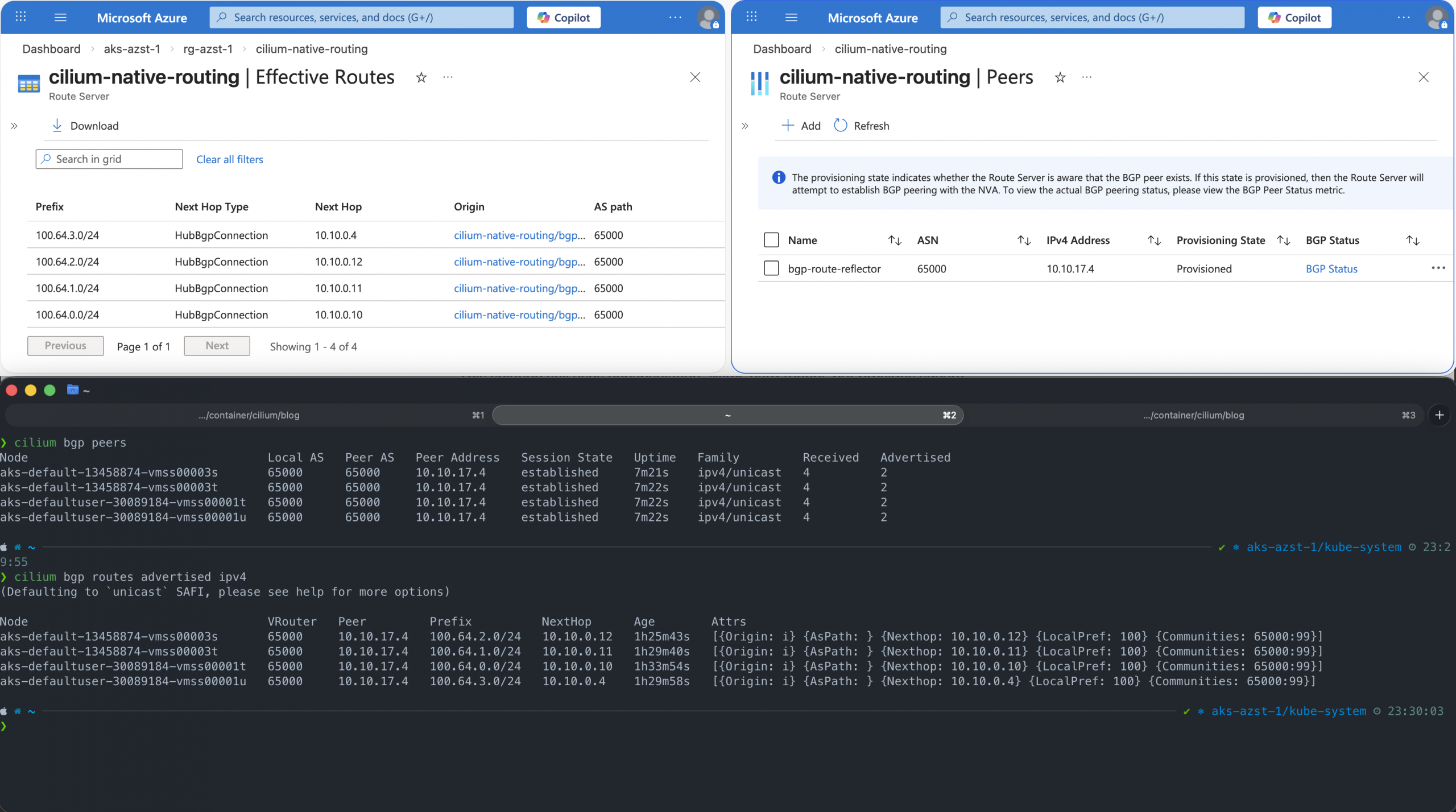
Everything looks good, and we can proceed with the final check, testing connectivity between pods on different Kubernetes nodes.
First, I ran Hubble CLI to observe the network traffic for my application namespace and then used curl to access the public endpoint provided via the Istio Ingress Gateway.
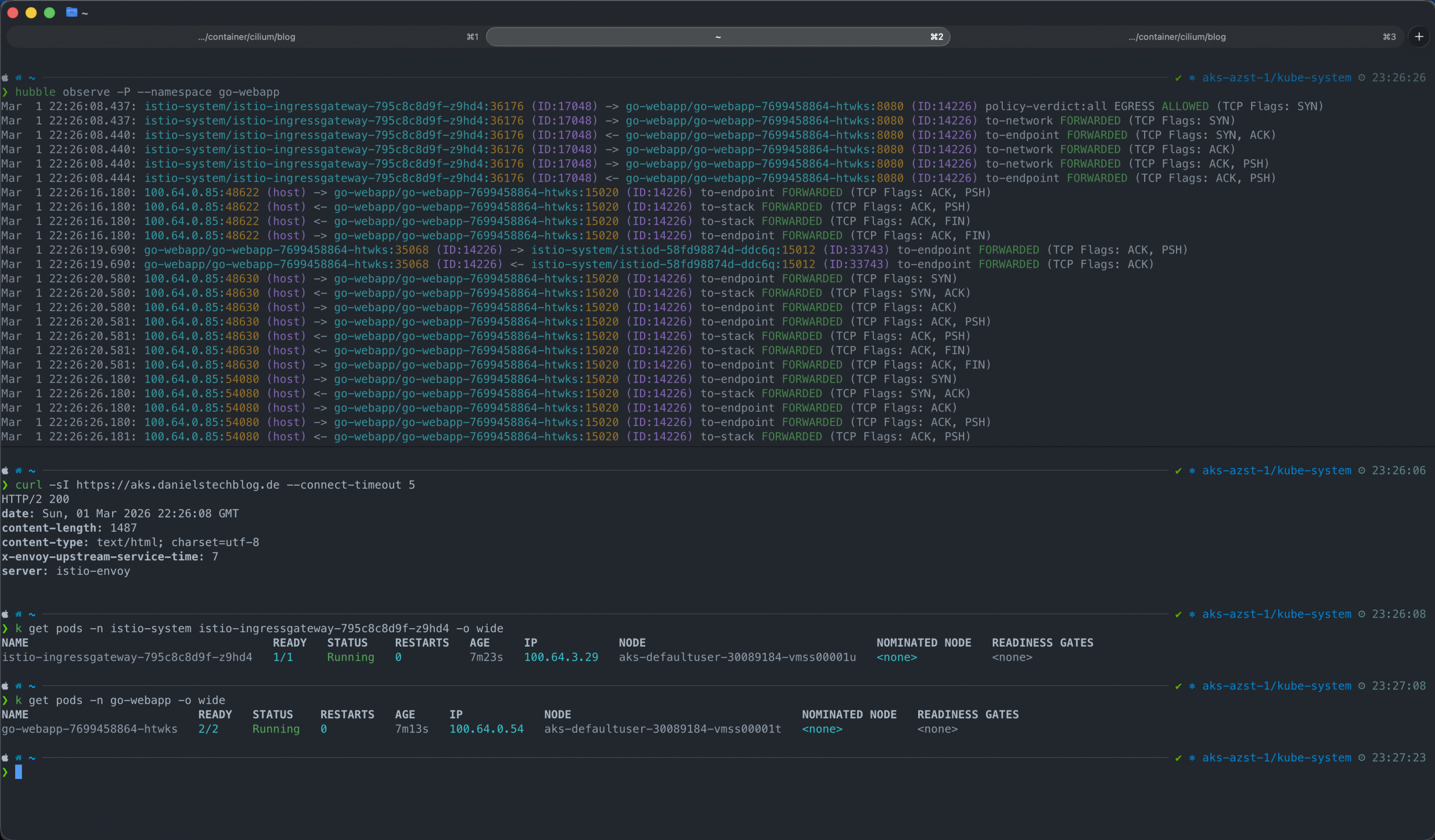
In the Hubble CLI output, we see that packets hit the network directly, to-network, and are not encapsulated. The curl command shows that our call succeeded successfully as the application responded with an HTTP 200 status code.
Summary
Enabling Cilium native routing on Azure Kubernetes Service BYOCNI requires some workarounds and additional resources in Azure, depending on the scenario that you would like to implement.
The simplest solution that provides an additional benefit is enabling WireGuard for network encryption, as WireGuard tunnels are implemented between every Kubernetes node in the cluster. Unfortunately, packets will still be encapsulated before being sent over the encrypted WireGuard tunnel. Hence, this solution works without further work and configuration on the Azure network side.
The more sophisticated solution is the use of BGP for route advertisements. Using the Azure Route Server to program the Azure SDN stack together with a BGP route reflector enables a solid enterprise-ready solution, enabling Cilium native routing on Azure Kubernetes Service BYOCNI.
Now the question is, what should I use when running Cilium on an Azure Kubernetes Service with BYOCNI?
When we follow documented and supported configurations, the answer is to stick with the standard routing mode: encapsulation via VXLAN/Geneve.
On the other hand, the aksbyocni setting only checks for the routing mode setting and does nothing else regarding Cilium’s Helm chart configuration. Hence, when you really want to use Cilium native routing on Azure Kubernetes Service BYOCNI, I recommend the solution with the Azure Route Server and the BGP route reflector, which provides a scalable and manageable solution.
You can find the BGP example configurations on my GitHub repository.
-> https://github.com/neumanndaniel/kubernetes/tree/master/cilium/native-routing